

Get paid and send money from WhatsApp
Payd runs inside a WhatsApp chat. Share your USD or EUR details, receive stablecoins, send money and check your balance, all without opening another app.

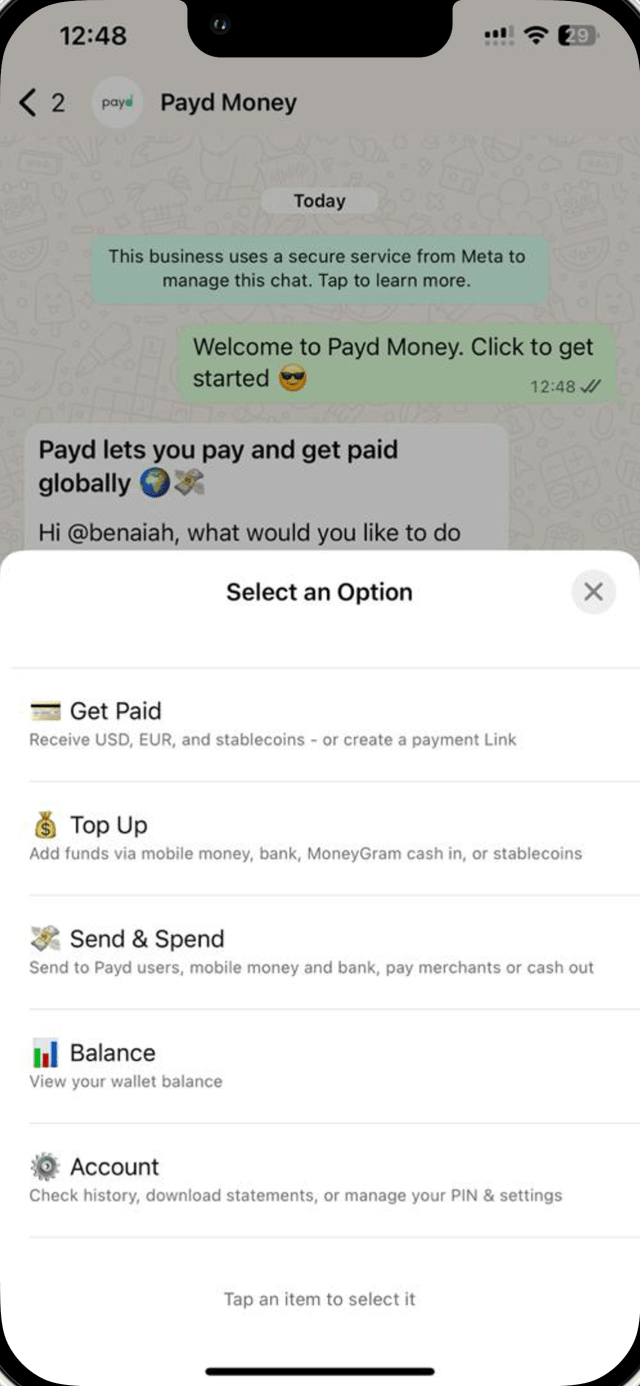
What you can do in the chat
Get paid
Receive USD, EUR and stablecoins, or create a payment link.
Top up
Add money from mobile money, a bank transfer or stablecoins.
Send money
Pay Payd users, mobile money, banks and merchants, or cash out locally.
Check your balance
See your balance and a summary of your transactions in the chat.
Manage your account
Check history, download statements and change your PIN and settings.

Start in three steps
- 1
Open Payd in WhatsApp
Tap the button on this page. It opens a chat with Payd's business account.
- 2
Say hello
Send "Hello" or tap the prompt on the screen.
- 3
Pick an option
Choose from the menu and follow the prompts to get paid, send or spend.
Questions
How do I start?
What can I hold and send?
How is my money protected?
What does it cost?
Open Payd in your next chat
Start in WhatsApp now. Create a Payd account first if you don't have one.